

Description
Download X New Tab Page – Chrome Apps, Speed Dial, New Tab Page
Overview
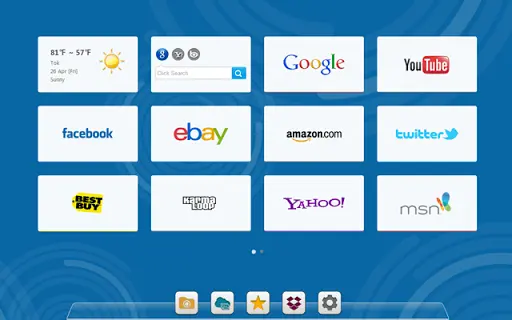
X New Tab Page is a browser-based utility designed to enhance the default New Tab page in Google Chrome. It transforms the standard blank slate into a customizable, feature-rich interface that supports speed dials, quick access to bookmarks, and real-time information displays. The software is tailored for users who want to streamline their browsing workflow by consolidating frequently visited websites, search functions, and personal tools into a single, intuitive dashboard.
By leveraging HTML5 technology, X New Tab Page delivers a responsive and interactive experience across supported platforms. It enables users to organize their digital workspace efficiently, whether for professional tasks or personal browsing. The tool is especially beneficial for individuals managing multiple projects, relying on numerous web applications, or seeking a more personalized start page that reflects their daily online habits.
With cloud-based synchronization, user configurations are preserved across devices, reducing the risk of data loss. The extension supports integration with popular OpenID providers such as Google, Facebook, and Twitter, facilitating secure login and seamless setup. While the developer did not provide detailed background information, the software’s long development history and consistent updates suggest a dedicated team focused on user experience and functionality.
Key Features & Capabilities
- Custom Speed Dials: Users can create personalized speed dials for their most visited websites, with access to hundreds of preloaded logos and the ability to upload custom ones.
- Cloud Synchronization: All settings, including dial layouts, wallpaper choices, and search engine preferences, are saved in the cloud to ensure consistency across devices.
- Integrated Search Functionality: Search engines like Google, Bing, and Yahoo are embedded directly into dial boxes, enabling instant searches without opening a new tab.
- Real-Time Widgets: The interface supports dynamic plugins such as weather reports, IP detection, calendar views, and recent browsing history displays.
- Layout Customization: Users can adjust dial box size, opacity, shape, and arrangement, and choose from a variety of wallpapers—either preloaded or uploaded.
- Bookmark and App Management: The tool offers quick access to Chrome bookmarks, extensions, downloads, and history, simplifying navigation within the browser environment.
- Multi-Language Support: Available in multiple languages, including Russian, Spanish, Portuguese, German, and French, reflecting broad international reach.
These features collectively help users reduce time spent on repetitive navigation tasks and improve focus during both work and leisure browsing. The ability to personalize the interface enhances usability and satisfaction, making it ideal for power users and casual internet surfers alike.
User Interface, Workflow & Performance
The user interface of X New Tab Page is built around a clean, grid-based layout that organizes speed dials and widgets in a visually balanced manner. Navigation is intuitive, with drag-and-drop functionality for repositioning dials and quick access to settings via a central configuration panel. The design emphasizes simplicity, allowing users to customize their dashboard without technical complexity.
Workflow efficiency is enhanced through direct access to core browser functions—search, bookmarks, history, and extensions—right from the start page. The embedded search bar within dial boxes eliminates the need to switch tabs, streamlining the research process. Real-time updates from widgets like weather and calendar contribute to a more proactive browsing experience.
Performance details were not specified by the developer. However, given its lightweight footprint of 1.2 MB and reliance on HTML5, the software is expected to operate efficiently without significant impact on system resources. The developer did not provide specific information on CPU or RAM usage. Stability is assumed based on the extension’s long update history and consistent bug fixes. Users can expect a stable experience, particularly on modern systems with up-to-date Chrome browsers.
Compatibility & System Requirements
X New Tab Page is compatible with Windows, Mac, and Linux operating systems, ensuring broad accessibility across desktop environments. It is designed as a Chrome extension, requiring Google Chrome to be installed and updated to a supported version for full functionality.
The installation size is listed at 1.2 MB, indicating a minimal footprint that should not strain storage resources. The developer did not specify exact system requirements such as minimum RAM, processor speed, or Chrome version compatibility. However, since the extension is built with HTML5 and uses cloud-based services, it is likely optimized for modern hardware and recent Chrome releases.
Platform compatibility information is limited to the operating systems listed. The extension may not support older versions of Chrome or non-Chrome browsers. Users should ensure their browser is up to date to avoid potential issues. The developer did not provide details on hardware requirements or performance under heavy multitasking scenarios.
Pros and Cons
Pros
- Lightweight at only 1.2 MB
- Cloud-based sync ensures settings are preserved across devices
- Extensive customization options for layout, colors, and widgets
- Integrated search functionality within speed dials
- Supports multiple languages and OpenID logins
- Free to download and use
- Regular updates and long-term development history
Cons
- Requires Google Chrome to function
- Exact system requirements were not listed
- Performance behavior under high load was not disclosed
- Some advanced features may be restricted due to Chrome extension limitations
- Latest update was released in 2015, suggesting limited current development activity
FAQ Section
Is X New Tab Page compatible with all versions of Google Chrome?
While the software is designed for Google Chrome, the developer did not specify exact version compatibility. It is recommended to use a recent Chrome release for optimal performance.
Is the software secure and safe to use?
X New Tab Page uses cloud storage for user data, with a privacy policy available at the provided link. The extension leverages standard OpenID authentication methods, which are widely recognized as secure. However, users should review the privacy policy to understand data handling practices.
Can I use X New Tab Page offline?
Basic functionality such as viewing saved speed dials and using locally stored settings may work offline. However, cloud sync and real-time widgets like weather reports require an internet connection.
Does X New Tab Page support multiple user accounts?
Yes, the extension supports login via Google, Facebook, and Twitter, allowing users to switch between accounts and maintain separate configurations.
How often is the software updated?
The latest update was released on March 19, 2015. While the extension has a long history of updates, current development activity appears limited.
Final Thoughts + CTA
X New Tab Page remains a practical tool for enhancing the Google Chrome experience, offering a highly customizable start page with speed dials, integrated search, and real-time widgets. Its cloud sync feature ensures that user preferences are preserved, and the lightweight design minimizes system impact. Despite the lack of recent updates, the software continues to deliver core functionality reliably.
It is best suited for users who value organization, quick access to web resources, and a personalized browsing environment. While newer alternatives may offer more modern features, X New Tab Page stands out for its simplicity, long-standing reliability, and free availability.
Download X New Tab Page now
Guides & Tutorials for New Tab Page App for Chrome
How to install New Tab Page App for Chrome
- Click the Preview / Download button above.
- Once redirected, accept the terms and click Install.
- Wait for the New Tab Page App for Chrome download to finish on your device.
How to use New Tab Page App for Chrome
This software is primarily used for its core features described above. Open the app after installation to explore its capabilities.
User Reviews for New Tab Page App for Chrome 0
No reviews found





